How to Apply for KIIP: Socinet Account, Level Test, TOPIK Placement and Class Sign-up
Also in: Tiếng Việt · Bahasa Indonesia · Bahasa Melayu · اردو · বাংলা
Signing up for KIIP happens online, mostly in Korean. This guide walks you through it step by step: making your Socinet account, finding your starting level, booking the level test and signing up for a class in Busan. New to KIIP? Start with what KIIP is and why it matters.
Before you start
- Your ARC: you need your Alien Registration Card and number. See how to get your ARC in Busan.
- A computer: Socinet works best on a computer. Use your browser's translate button if the Korean is hard to follow.
- Your TOPIK score report (if you have one): it can let you skip the level test.
Know the Socinet home page
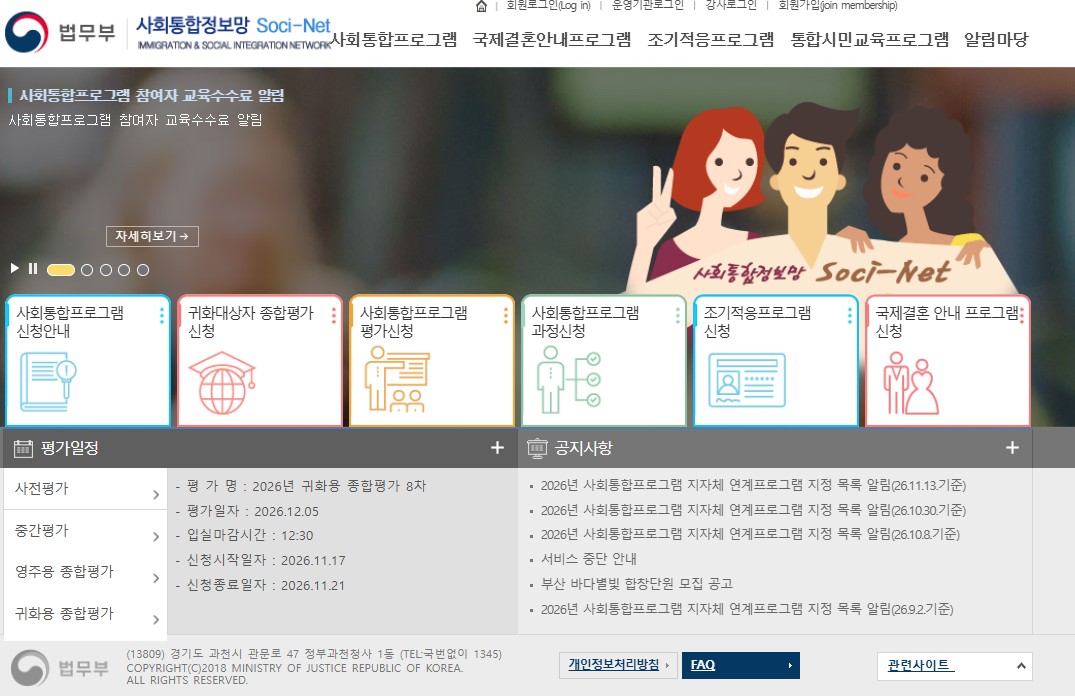
| Button (Korean) | What it's for |
|---|---|
| 회원가입 (top right) | Make your account |
| 사회통합프로그램 신청안내 | Official information on how to apply |
| 사회통합프로그램 평가신청 | Book a test, such as the level test |
| 사회통합프로그램 과정신청 | Sign up for a class |
| 평가일정 | Test dates and application periods |
| 공지사항 | Notices and changes |
Step 1: Make a Socinet account
Go to socinet.go.kr and click 회원가입 (join). Sign up with your Alien Registration Number. Your name and details must match your ARC exactly.
Step 2: Choose your starting point
- Start from Level 0: if you're a complete beginner, sign up for Level 0 directly. No test needed.
- Take the level test (사전평가, sajeon pyeongga): a placement test with listening, reading, writing and a short speaking interview. Your score decides your starting level.
- Use your TOPIK score: with a valid TOPIK certificate, you can skip the level test and start higher. Send your TOPIK score report and the KIIP link form to your immigration office (or apply in Socinet under My Page). Call 1345 to check where to send it.
| Your TOPIK level | Your KIIP starting level |
|---|---|
| TOPIK 1 | Level 2 |
| TOPIK 2 | Level 3 |
| TOPIK 3 | Level 4 |
| TOPIK 4, 5 or 6 | Level 5 |
Step 3: Book the level test (if you need it)
- Where: click 사회통합프로그램 평가신청 on Socinet, or go to kiiptest.org, the test site run by the Korea Immigration and Integration Foundation.
- When: check 평가일정 for the application period of each test. Places are first come, first served, so apply on the first day.
- Fee: about KRW 38,000.
Step 4: Check your level
After the test (or after your TOPIK score is linked), your starting level appears in your Socinet account.
Step 5: Find a class in Busan
- Click 사회통합프로그램 과정신청, search for operating centers in Busan (부산) and choose a class time that fits your schedule.
- Ask your university's international office first. Your campus or a center nearby may run KIIP classes. Study Busan Hub can also help.
- Levels 0 to 2 are taught in person, so choose a center you can reach easily by subway or bus.
Step 6: Pay the fee
Pay in Socinet (My Page) by card or bank transfer. Your teacher will tell you when. Level 0 is free and Levels 1 to 4 cost KRW 100,000 each. If you attend every class, the next level is half price. See all levels and fees →
Fees, rules and test dates can change. Before you apply, check the latest on the official site: Socinet (KIIP)
Common mistakes to avoid
- Details that don't match your ARC: check the spelling of your name before you submit.
- Missing the application days: test places fill up fast. Set a reminder.
- Not sure what to do? Call the immigration contact center at 1345. Help is available in many languages.
See also: KIIP explained: levels, fees and visa benefits · TOPIK explained
Comments & student tips
Did something change, or did you do it differently? Share it here and help the next student. Every comment is checked by our team before it appears.
Loading comments…